Mobile Shelving Selection Guide
Manual vs Electric vs Smart Mobile Shelving: Which System Should You Choose?
Manual vs electric vs smart mobile shelving is mainly a comparison of how the shelving moves, how users control it, what safety functions are required, how frequently records are accessed and how much technical complexity the project can support.
All three systems can provide high-density storage. The main difference is not basic capacity, but the operating and control layer added above the shelving structure.
Buyer Quick Guide
Choose the System According to the Problem You Need to Solve
A good manual vs electric vs smart mobile shelving decision should match the archive workflow without adding controls that the customer does not need or cannot maintain.
Choose Manual Mobile Shelving
Manual shelving is suitable when storage density is the main goal and a mechanical handwheel system provides sufficient operating convenience.
- Low or moderate retrieval frequency
- Simple mechanical operation preferred
- No electrical drive required
- Mechanical locking is sufficient
- Lower technical complexity is important
Choose Electric Mobile Shelving
Electric shelving is suitable when staff access the archive more frequently or longer shelving banks make motorized movement desirable.
- Frequent daily access
- Longer or heavier shelving banks
- Powered movement preferred
- Project-specific safety functions required
- Full management integration is unnecessary
Choose Smart Mobile Shelving
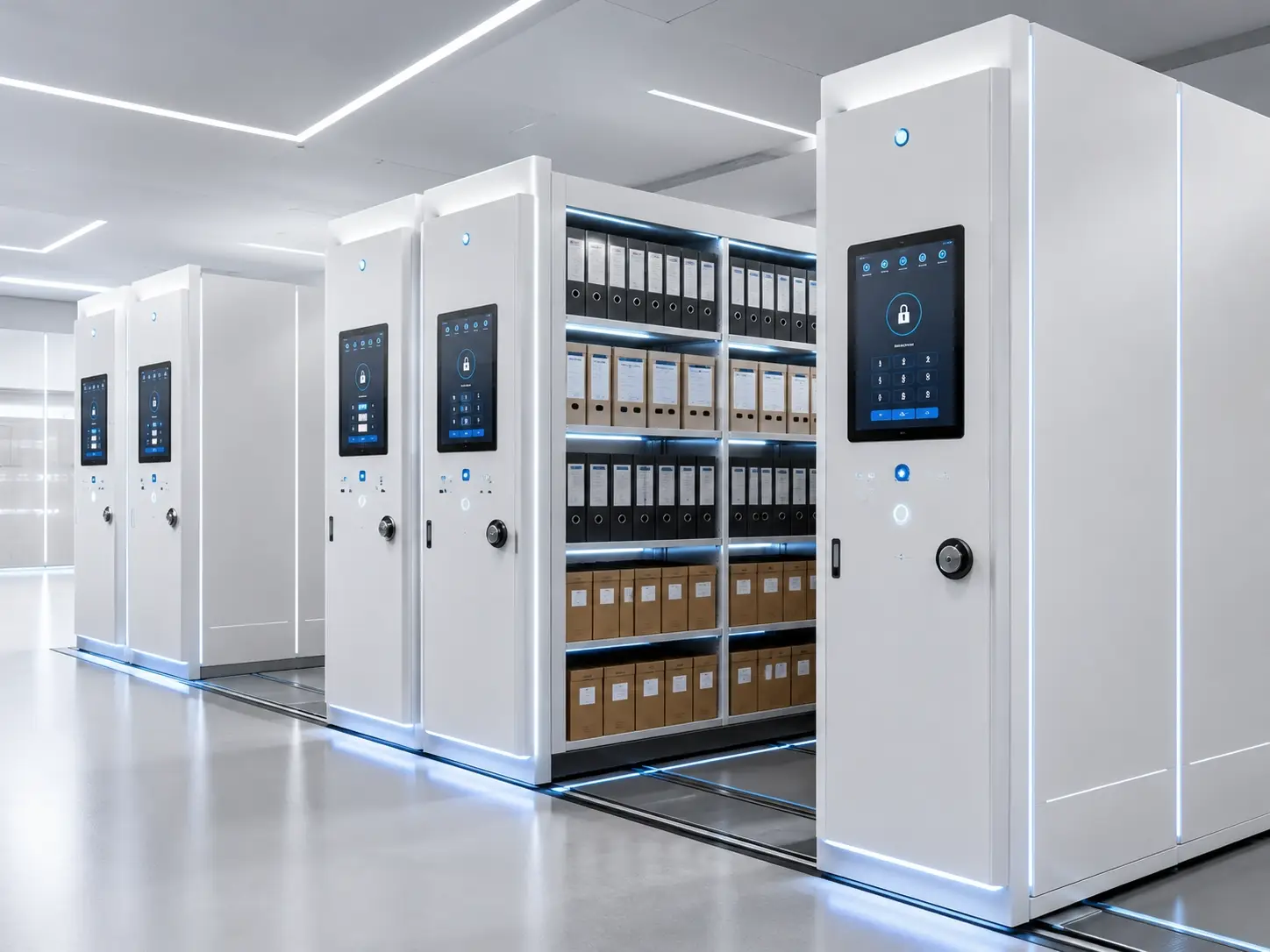
Smart shelving is relevant where the project requires powered movement together with a touchscreen, visible operating status, configured permissions or other approved control functions.
- Defined access-control requirement
- Touchscreen operation is required
- Operating status should be visible
- Optional project integration is planned
- Technical support for the control system is available
At-a-Glance Comparison
Manual vs Electric vs Smart Mobile Shelving Comparison
The table provides a preliminary decision framework. Final functions depend on the selected equipment and approved project specification.
What All Three Systems Share
The Same High-Density Storage Principle
Mobile shelving rows move along tracks so the project does not need to maintain a permanent aisle between every row.
This means storage density is mainly determined by room dimensions, rows, bays, shelf levels, shelf depth, clear shelf width and the required operating aisle—not by whether the system is manual, electric or smart.
Manual System
Mechanical Movement With Lower Control Complexity
Manual mobile shelving uses a handwheel and mechanical transmission to move shelving rows without requiring electrical power for normal operation.
How Manual Mobile Shelving Works
The user unlocks the required row and turns the handwheel to move the shelving bank and open the required aisle. Final operating effort depends on row length, stored load, transmission design, rail condition and adjustment.
Main Advantages
- No electrical drive required for normal movement
- Lower technical complexity
- Simpler inspection and maintenance
- Suitable for low or moderate access frequency
- Useful where straightforward mechanical operation is preferred
Main Limitations
- Requires more physical operating effort
- Less convenient for very frequent retrieval
- Does not normally provide digital management functions
- Safety is primarily mechanical unless otherwise specified
- Long or heavily loaded rows require careful design
Best Project Conditions
Manual shelving is often suitable when high-density storage is the main objective, archive access is controlled, electrical work is undesirable and a simple long-term operating system is preferred.
Electric System
Powered Movement for Frequent Archive Access
Electric mobile shelving uses motors and local controls to move shelving rows and open the required aisle.
How Electric Mobile Shelving Works
The operator selects the required movement through the configured local control interface. Motorized movement reduces physical effort and can be useful for longer shelving banks or frequently accessed archives.
Main Advantages
- Lower physical operating effort
- Suitable for frequent archive retrieval
- Useful for longer or heavier shelving banks
- Project-specific emergency-stop and safety functions
- Optional aisle-lighting or control features where specified
Main Limitations
- Higher technical scope than manual systems
- Requires electrical supply
- Contains additional maintenance components
- Electrical installation and commissioning must be coordinated
- Does not automatically include full archive-management functions
Best Project Conditions
Electric shelving is often suitable where users retrieve records frequently and powered movement improves daily operation, but advanced permission or software-management functions are not a confirmed requirement.
Smart System
Powered Movement With a Configured Control Layer
Smart mobile shelving combines motorized movement with touchscreen operation and additional project-defined control functions.
How Smart Mobile Shelving Works
A smart configuration can use a touchscreen interface, visible system status, configured user permissions and other approved control functions. Identification, monitoring or external integration functions should only be included where they are specifically defined and technically confirmed for the project.
Potential Advantages
- Touchscreen operation
- Visible system and aisle status
- Configured access permissions where required
- Optional project-defined control functions
- External interface potential where technically approved
Main Limitations
- Higher initial technical scope
- More electrical and control components
- Requires suitable technical support
- Integration requires coordination with the customer’s systems
- Unused smart functions can add unnecessary cost and complexity
Best Project Conditions
Smart shelving creates value when a customer has a defined requirement for touchscreen control, system status, configured permissions or other approved archive-management functions—not simply because a project is large.
Selection by Project Priority
Match the System to the Operational Requirement
Manual Mobile Shelving
Suitable when the project needs high-density storage and straightforward mechanical operation.
Electric Mobile Shelving
Suitable when frequent retrieval or longer rows justify powered movement.
Smart Mobile Shelving
Suitable where configured permission or system-status functions are part of the approved requirement.
Manual System
A mechanical system may be easier to inspect and support where local electrical-control resources are limited.
Electric System
Powered movement can reduce user effort where shelving banks become longer or heavier.
Smart System
Consider smart architecture where future external interfaces are realistic and their technical scope can be defined.
Safety Comparison
Safety Requirements Increase With the Operating System and Project Scope
The final safety configuration should reflect the shelving type, number of users, room conditions and approved project requirements. Specific devices should not be assumed until the selected system is confirmed.
Mechanical locks, braking, anti-tilt arrangements, end stops and other suitable mechanical protections can be configured according to the project.
Electric systems can include emergency-stop, obstacle-protection, overload, warning or aisle-safety functions according to the selected configuration.
Smart systems can coordinate powered movement, project-defined safety logic, visible status and configured control functions.
Initial Cost and Project Scope
Compare Technical Scope Instead of Using an Artificial Price Ratio
Actual mobile shelving cost depends on room layout, row quantity, shelf loading, rails, controls, safety functions, installation, packing and delivery scope. Manual, electric and smart systems should therefore be compared qualitatively until the project configuration is confirmed.
Manual
A mechanical system normally has fewer electrical and control components.
- Mechanical transmission
- No powered movement for normal operation
- Lower control complexity
- Generally simpler maintenance scope
Electric
Electric movement adds motors, electrical controls, wiring and project-specific safety functions.
- Motorized drive
- Local control system
- Electrical installation
- Commissioning and testing
Smart
Smart configurations add control architecture and any approved management or interface functions above the powered system.
- Touchscreen control
- Configured permissions where required
- Additional project-defined functions
- Potential integration and support scope
Application Considerations
Different Archive Environments May Require Different Operating Levels
These examples describe selection logic only. The final system should be based on the actual room, retrieval workflow and approved project requirements.
Government Archives
Manual or electric systems may suit general records; smart control can be considered where additional access management is specified.
Enterprise Archives
Choose according to retrieval frequency, department workflow and physical access requirements.
Medical Records
Inactive records may prioritize density while frequently used or restricted zones can require different operating configurations.
Financial Records
Access frequency and confidentiality requirements can influence locking and control options.
Court Records
Closed cases, active files and restricted records may require different storage and access arrangements.
Universities
Institutional archives, research material and departmental records can use different storage zones.
Libraries
Mobile shelving is more appropriate for closed-stack or lower-frequency collections than open public browsing.
Research Centers
Controlled technical records may justify powered or project-specific smart configurations.
Selection by Archive Scale
Room Size Alone Should Not Decide Manual, Electric or Smart
Archive scale is one factor, but access frequency, row length, stored load, security requirements and available technical support are usually more important.
Manual Is Often Sufficient
Smaller rooms with moderate retrieval may not justify additional powered or smart control functions.
Typical starting point: ManualManual or Electric
Choose according to row length, stored load, retrieval frequency and desired operating convenience.
Typical starting point: Manual or ElectricElectric or Smart May Be Appropriate
Larger installations may benefit from powered movement, while smart functions should only be added when there is a defined control requirement.
Typical starting point: Electric; Smart where justifiedCommon Selection Mistakes
Avoid Adding Complexity Without Improving the Archive Workflow
Choosing Smart Shelving Only Because It Looks Advanced
Each smart function should solve a defined operational or control requirement.
Ignoring Floor Conditions
High-density storage can create concentrated loaded weight regardless of the operating system.
Comparing Only the Purchase Price
Installation, electrical work, maintenance, controls, support and delivery scope also affect total project cost.
Using One System for Every Archive Zone
Active, inactive and restricted records can require different storage and access methods.
Specifying Integration Before Defining the Workflow
Identification, permissions or external interfaces need a clear user process and technical boundary before they are specified.
Ignoring Emergency Access Requirements
Powered systems should consider access and operating procedures for electrical or control-system faults according to the final design.
Mobile Shelving Selection Checklist
Information Needed for Manual vs Electric vs Smart Mobile Shelving Selection
Archive Information
- Stored-item type and dimensions
- Current archive quantity or linear shelf length
- Expected future growth
- Active and inactive record groups
Room Information
- Clear room dimensions
- Doors, columns and fixed obstacles
- Floor conditions and structural review
- Required access routes and future expansion
Operation and Security
- Number of users
- Retrieval frequency
- Row length and expected loading
- Physical access restrictions
- Any required touchscreen or permission functions
Technical and Commercial
- Local electrical supply
- Technical support availability
- Installation responsibility
- Destination country
- Packing and delivery scope
Typical Technical Reference
Preliminary Reference Ranges for Manual, Electric and Smart Systems
Final specifications depend on the room, stored material, shelf loading, selected operating method and approved project configuration.
External reference: ISO 11799:2024 — document storage requirements for archive and library materials .
Project Workflow
From Archive Requirements to the Final System Selection
Collect Requirements
Review room dimensions, archive quantity, growth and access frequency.
Calculate Capacity
Estimate rows, bays, shelf levels and preliminary reserve capacity.
Compare Systems
Evaluate manual, electric and smart operation against the actual workflow.
Develop Layout
Plan mobile rows, fixed storage, aisles and project-specific archive zones.
Confirm Functions
Define controls, safety options, locks and any approved smart functions.
Approve Specifications
Confirm dimensions, loading, rails, finish and project scope.
Production and Delivery
Proceed according to the approved technical and commercial configuration.
Installation and Testing
Install, adjust and test the functions included in the approved project scope.
Frequently Asked Questions
Manual vs Electric vs Smart Mobile Shelving FAQ
Which mobile shelving system normally has the lowest initial technical scope?
Manual mobile shelving generally has the lowest technical complexity because normal movement does not require motors or an electrical control system.
Does smart mobile shelving store more files than manual shelving?
Not automatically. Storage capacity mainly depends on room layout, rows, bays, shelf levels, shelf depth and operating-aisle arrangement.
Is manual mobile shelving difficult to move?
Operating effort depends on row length, stored load, transmission design, rail condition and adjustment. The system should be designed for its intended load.
What is the main advantage of electric mobile shelving?
Electric mobile shelving reduces physical operating effort and can provide convenient powered aisle opening for frequently accessed or longer shelving banks.
What is the main advantage of smart mobile shelving?
Smart shelving can add a control layer such as touchscreen operation, visible system status and configured permission functions where these are required by the project.
What happens if power is unavailable?
The final powered system should include an appropriate access or operating procedure for power or control-system faults according to the approved design.
Can manual mobile shelving include locks?
Yes. Mechanical locking options can be selected according to the project requirement.
Can electric shelving include access-control functions?
Selected electric configurations may include project-specific access-control functions. The exact scope should be technically confirmed before quotation and production.
Is RFID required for smart mobile shelving?
No. RFID is not a necessary feature of smart mobile shelving. Identification or tracking functions should only be included where the project specifically requires them and the integration method is confirmed.
Which system normally has the lowest maintenance complexity?
Manual mobile shelving generally has lower maintenance complexity because it contains fewer electrical and digital control components.
Which system is best for restricted archives?
The correct choice depends on the required physical and operational access controls. Mechanical locks may be sufficient for some archives, while projects requiring configured permissions may justify a smart control system.
Should every large archive room use smart shelving?
No. A large archive can still use manual or electric shelving when the workflow does not require additional smart-control functions.
Related SAS Pages
Continue Planning the Mobile Shelving Project
Mobile Shelving Selection
Need Help Choosing Manual, Electric or Smart Mobile Shelving?
Send the archive-room dimensions, floor plan, stored-item dimensions, approximate quantity, expected growth, retrieval frequency and any required control functions. SAS can compare the three systems and prepare a preliminary configuration for review.